
Audit Logs and Dashboard
Updated
Scrumpy maintains two separate audit trails for full transparency and compliance. Every timestamp in the audits, dashboards, chat, and estimation history is shown in your Jira timezone.
The audit tabs and the Space settings Dashboard live in space settings. You need permission to manage the space in Jira to open them, and that permission is checked again when the data loads. Being able to open a work item panel is not enough. The lighter Dashboard on the Space Estimations page is available to anyone who can open that page, and it only counts work items you can open in Jira.
Voting Audit
The Voting Audit tab shows a chronological log of all significant events that occurred in voting sessions for the space.
Events recorded include:
- Session created, voted, paused, resumed, completed, cancelled
- Estimate set or modified by the moderator
- Required voters updated
- Async complete-until deadline set or cleared
- Estimate accepted and written to Jira
- Reminders sent to unvoted participants
Each event shows:
- Occurred: Timestamp of the event
- Type: The icon of the work item's type, including newer and custom types
- Work item: Clickable issue key that opens the work item in a modal
- Perspective: Which estimation perspective was used
- Actor: The user who triggered the event
- Description: Human-readable summary of what happened
Enter a search term and click Search to filter by work item key, perspective, or description. Choose 15, 30, 45, or 60 rows per page, and use the pagination controls to browse large histories.
The Voting Audit lists only work items you can open in Jira. Events for issues hidden from you by issue-level security are left out, and they are not counted in the page totals.
Only the space owner can delete the voting audit log. If you can open space settings but are not the space owner, the Delete audit log button is replaced by a note explaining this. When you are the space owner, a confirmation dialog appears first, and the deletion cannot be undone.
Configuration Audit
The Configuration Audit tab tracks every change made to space permissions and perspective settings. Each entry records:
- Who made the change
- What was changed (with a human-readable description)
- When the change was made
- Which perspective was affected (if applicable)
Like the voting audit, this table is searchable with a Search button and paginated with the same page-size selector. Only the space owner can clear it with the Delete audit log action. Other users see a note in place of the button.
Dashboards
Scrumpy has two dashboards with different purposes.
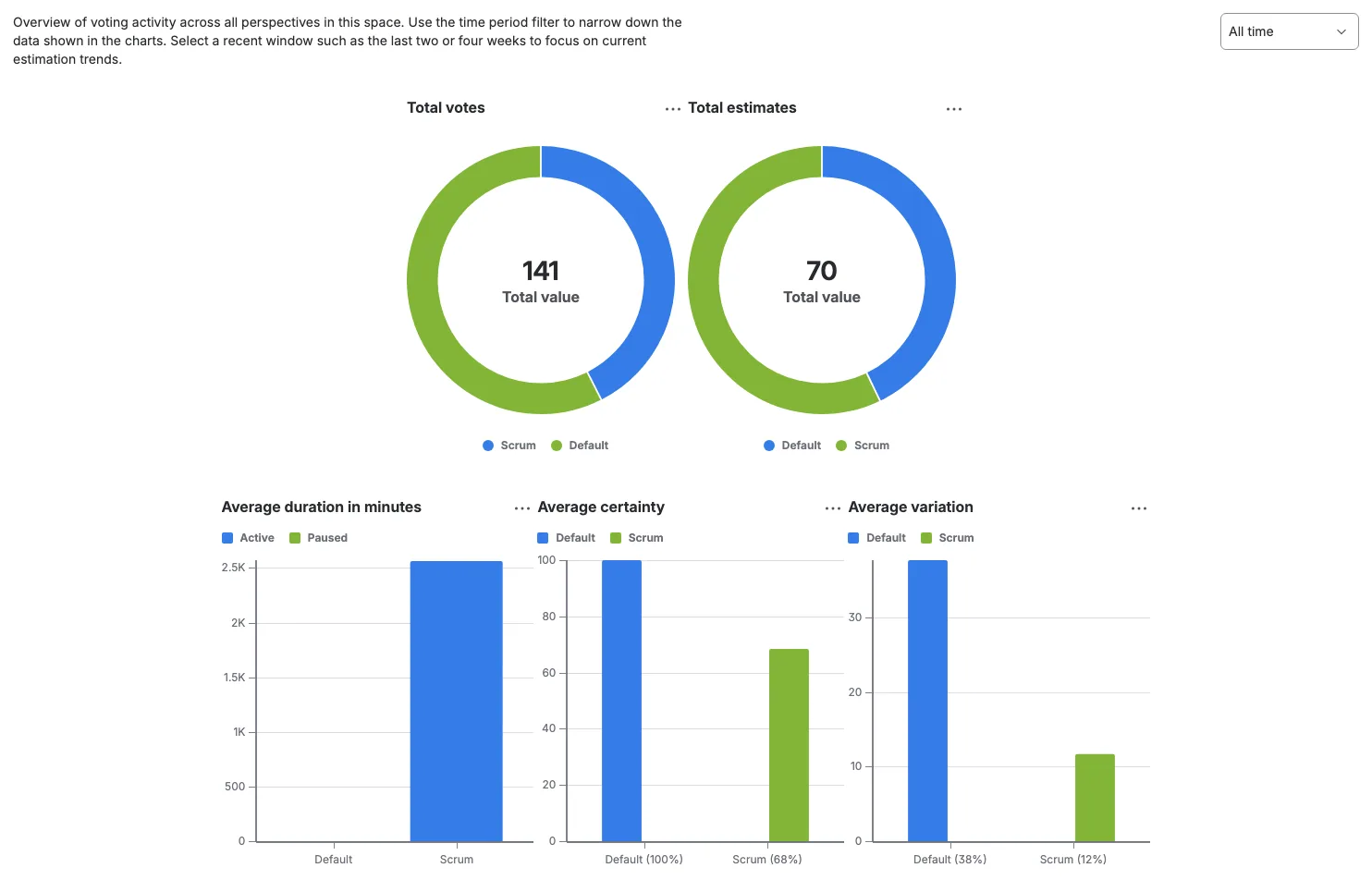
Space Settings Dashboard
The Dashboard tab in Space settings provides the full analytics view. Use the range selector to choose 1, 2, 4, or 8 weeks, or All time. Your choice is remembered in this browser tab. All time is still limited to the 90-day retention window, and the charts refresh when you open the tab again.
Charts shown:
- Total votes per perspective (donut)
- Total estimates per perspective (donut)
- Average certainty per perspective (bar)
- Average variation per perspective (bar)
- Average duration per perspective (stacked active and paused time, shown in seconds or minutes)
- Total estimates per day (line)
- Average voters per day (line)
- Average certainty per day (bar)
- Average variation per day (bar)
- Total duration in minutes per day (stacked)
Only the space owner can delete all accepted session records with Delete estimation log at the bottom of the tab. A confirmation appears first, and the deletion cannot be undone. If you can open space settings but are not the space owner, the Delete estimation log button is replaced by a note explaining this.
Estimations Page Dashboard
The Dashboard tab on the Space Estimations page is a lighter, live overview with three charts and no time filter or delete action:
- Active Sessions by Perspective
- Unique Voters by Perspective
- Sessions by State per Perspective
Each chart shows its own empty state when there is nothing to display. Below the charts, avatars show everyone who has voted in any active session. The row appears once the first person votes. Sessions you already viewed on another tab appear right away, and the charts update as the rest of the space's sessions load in the background.
Data Retention
Scrumpy keeps voting audit entries, configuration audit entries, accepted estimates, and planning sessions for three months (90 days). Older data is removed automatically every day. Chat messages and their reactions are kept for 72 hours. The space owner can also delete all audit entries and the estimation log from their respective tabs; those deletions cannot be undone.
Space settings are kept until you change them. This includes the voting password, the voter and moderator lists, and every perspective setting. The 90-day retention window does not remove them, so a protected space stays protected and your team keeps its roles.