
Estimation History
Updated
Every accepted estimate is recorded in the estimation log, giving your team a record of sizing decisions for the last 90 days.
Viewing Estimation History
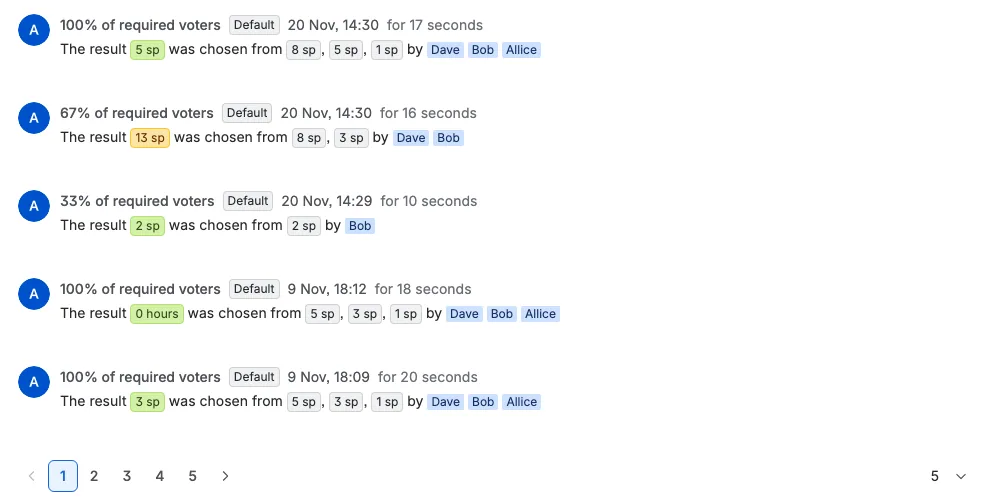
Open any Jira work item, expand the Activity area, open Apps, and choose Estimation log. This log shows each accepted estimate for the work item, newest first, with the perspective that produced it. When the work item has no accepted estimates yet, the log shows an empty state instead of a list. If the space has a password, the log asks for it first.
Scrumpy checks that you can open the work item in Jira before it shows the history. A work item hidden from you by Jira issue-level security is not returned.
A space administrator can hide the Scrumpy panel on work items and the Space Estimations page in space settings. The estimation log is hidden only when both of those are hidden. While either one is shown, the log stays available.
Pagination and Navigation
The estimation log is paginated for easy browsing through long histories. You can adjust the page size to 5, 10, 15, or 20 entries per page using the selector at the bottom of the log. Use the pagination controls to move between pages.
Live Updates
When a new estimate is accepted for the current work item, the estimation log updates automatically without needing to refresh the page. If you are on page one the new entry appears at the top. If you are on a later page, the table returns to page one so you can see the new entry. If the space has a password, live updates start only after you enter it.
What's Recorded
Each estimation history entry shows:
- Moderator: the moderator who finalized the estimate, shown as the entry's avatar
- Completion: how many of the required voters had voted
- Perspective: which estimation perspective was used
- Duration: how long the session took, shown as "for {duration}"
- Result: the final accepted estimate, plus all individual votes as comma-separated badges and the participants who cast them. Values use the perspective's deck labels, so story points carry the "sp" suffix, T-shirt sizes show their size, and a time perspective shows a work-day duration
- Timestamp: when the estimate was accepted, shown in your Jira timezone
The result is shown in a green badge. If the moderator set a different value before accepting, the badge is yellow and hovering it shows Overridden by the moderator.
Retention and Deletion
Estimation history entries are kept for three months (90 days). Older entries are removed automatically every day. To remove every entry for the space at once, use Delete estimation log on the space settings Dashboard tab; that action is permanent and cannot be undone. Archiving a planning session to Confluence keeps its estimates as a Confluence page beyond the 90-day window.
How Results Flow to Jira
When a moderator accepts an estimate:
- The final estimate is computed from all votes using the perspective's averaging method
- The result is written to Jira based on the perspective's estimation target:
- Default: Updates the board's estimation statistic (Story Points by default). For T-shirt cards, this uses the story point value you set for the chosen card
- Field: Updates the configured custom fields for points, time, or T-shirt sizes. A T-shirt field receives the size label
- The full voting session is saved for reference
Dashboard Analytics
The space Dashboard aggregates estimation history across all work items and perspectives to provide:
- Daily accepted estimate counts
- Average estimates by perspective
- Average voting duration by perspective
- Average certainty scores
- Average variation scores
- Average number of voters per session
Use the date range selector to focus on recent sprints or compare long-term trends.