
Archiving your plans
Updated
Archiving keeps a permanent record of a planning session or a capacity plan in Confluence. The team can look back later and see what was estimated, what was planned, and why. A space administrator chooses the Confluence space in space settings before anyone can archive.
Archive a refinement session
Open the Refinement/grooming tab, select the planning session, and select Archive next to Complete. The dialog shows the planning window and a preview of the work items with accepted estimates that will be written. Select Archive to create the page.
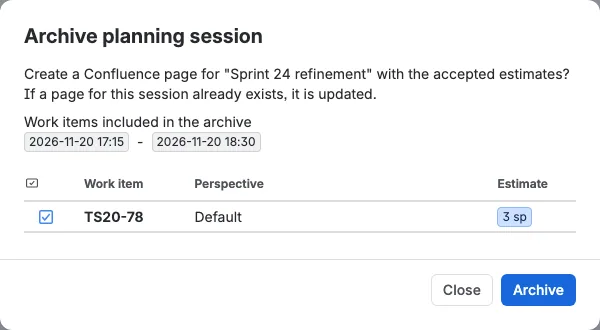
The generated page keeps the planning title, description, start and end time, the participants, and every accepted estimate with its perspective, votes, participants, and moderator.
Archive a capacity plan
Open the Capacity planning tab, select an active or future sprint in the combined table, and select Archive in the toolbar. The dialog previews the sprint and its dates, the sprint goal and its votes, the capacity decision, and the velocity summary. The team and work item tables are written to the page as well. Select Archive to create the page.
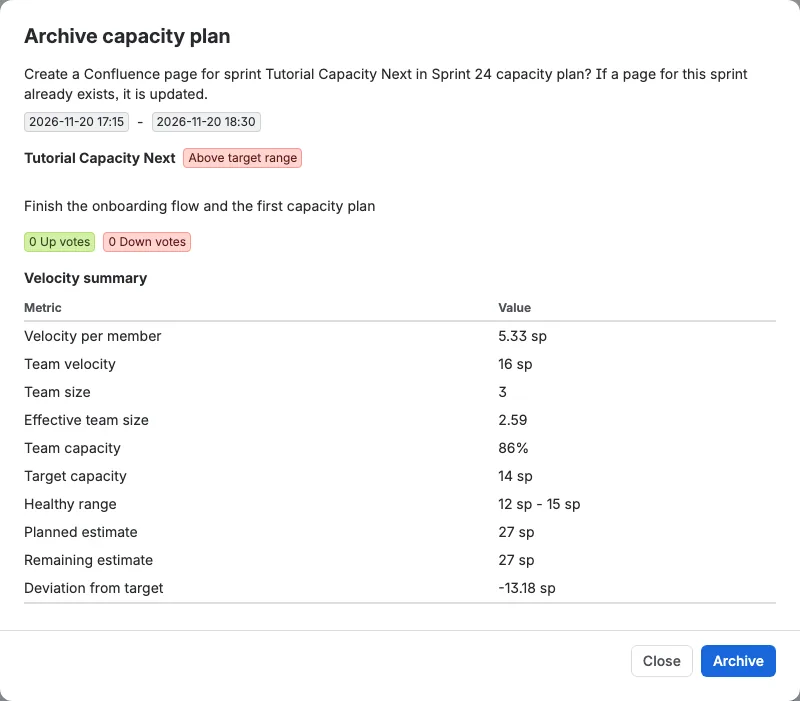
The generated page keeps the planning window, the sprint and goal, the goal votes, the velocity and target capacity, the team with hours and utilization, and the planned work items in order.
Find the pages later
Planning session archives sit under the Estimations parent page. Capacity archives sit under the Plannings parent page, in a child page named after the space and "Capacity planning". Archiving the same sprint again updates its page instead of creating a duplicate.